> For the complete documentation index, see [llms.txt](https://docs.apryse.com/llms.txt). Markdown versions of documentation pages are available by appending `.md` to page URLs; this page is available as [Markdown](https://docs.apryse.com/cli/docpub/docpub.md).
# DocPub: Command-Line Conversion to PDF, HTML, EPUB, Office, and More on Linux, Windows, and macOS
DocPub is an easy-to-use, multi-platform command-line program that can be used for high-quality batch conversion from a wide range of document formats to HTML, EPUB, XOD, XPS and PDF. It can also be u
**DocPub** is an easy-to-use command-line program that can be used for high-quality batch conversion from a wide range of document formats to HTML, EPUB, XOD, XPS, and PDF - available for Linux, Windows and Mac . It can also be used in conjunction with the Structured Output module to convert PDFs to DOCX, XSLX and PPTX.
Download DocPub
**Like other Apryse products, DocPub does not rely on any third party components. The technology is suitable for use in high-throughput server environments.**
SDK GuidesSDK Sample
## **Key Functions**
* Fast, high-quality conversion from practically any document to PDF (Portable Document Format), XPS (XML Paper Specification) or XOD (web optimized OpenXPS standard), HTML or EPUB format, that maintains the original document quality and layout and preserves hyperlinks, colors and fonts.
* Create XOD documents for use with Apryse WebViewer (HTML5, Silverlight, and Flash), including streaming conversions on-demand.
* The conversion process preserves the original document's meta-data as well as other non-graphical information such as bookmarks, logical structure, and articles.
* Thumbnail generation option for fast navigation through multi-page documents.
* Automatic repair of broken PDF documents.
* Support for all versions of the PDF Language Standard, including Acrobat 9 documents as well as ISO PDF (ISO 32000).
* Batch conversion.
* Wild card and subfolder processing.
* 100% conversion accuracy.
* Optional flattening to create PDF's that render faster on mobile devices with lower memory and speeds.
## **Common Use Case Scenarios**
* Developers may want to use DocPub to quickly add batch conversion support to any application or workflow that requires PDF, XPS, XOD, HTML or EPUB as output formats.
* Server-based, on-demand conversion of documents to PDF, XPS, XOD, HTML and EPUB files.
* Stream XOD conversions on-demand to a WebViewer client.
* Batch processing of large collections of files with the same conversion options.
* Extending existing applications to take advantage of the new XPS Print API and XPS print path available in Windows.
## **Operating Systems Supported**
* Windows, Linux and Mac.
## **System Requirements**
* At least 12 MB of free disk space.
* Memory requirement is dependent on source document being converted.
## Examples
{% tabs %}
{% tab title="Shell" %}
{% code lineNumbers="true" %}
```sh
#!/bin/sh
echo "Example 1) Convert a PDF document to Silverlight XPS (XOD):"
./docpub -f xod -o test_out "Apryse DocPub User Manual.pdf" --lic_key ""
echo
echo "Example 2) Convert a PDF to print/achiving quality XPS:"
./docpub -f xps -o test_out "Apryse DocPub User Manual.pdf" --lic_key ""
echo
echo "Example 3) Convert an XPS document to PDF:"
./docpub -f pdf -o test_out test_out/"Apryse DocPub User Manual.xps" --lic_key ""
echo
echo "Example 4) Convert generic XPS to Silverlight XPS (XOD):"
./docpub -f xod -o test_out --fname fromxps test_out/"Apryse DocPub User Manual.xps" --lic_key ""
```
{% endcode %}
{% endtab %}
{% endtabs %}
## **Conversion to DOCX, PPTX and XLSX**
While DocPub doesn't *directly* convert to Office formats, it can work in conjunction with the Structured Output module to do so.
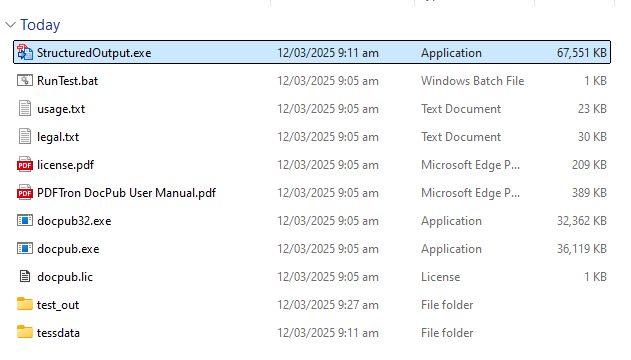
[Download the Structured Output module](https://www.pdftron.com/downloads/StructuredOutputWindows.zip) for the platform that you are using and extract it to the same folder as is used for docpub.exe.
The Structured Output module needs to be in the same folder as docpub.exe in order for PDF to Office conversion to occur.
It is now possible to convert to the various Office formats using
**-f docx**, **-f xlsx** and **-f pptx**.
{% tabs %}
{% tab title="Shell" %}
{% code lineNumbers="true" %}
```sh
./docpub -f docx -o test_out "PDFTron DocPub User Manual.pdf" --lic_key ""
```
{% endcode %}
{% endtab %}
{% endtabs %}
---
# Agent Instructions
This documentation is published with GitBook. GitBook is the documentation platform designed so that both humans and AI agents can read, navigate, and reason over technical content effectively. Learn more at gitbook.com.
## Querying This Documentation
If you need additional information that is not directly available in this page, you can query the documentation dynamically by asking a question.
Perform an HTTP GET request on the current page URL with the `ask` query parameter, and the optional `goal` query parameter:
```
GET https://docs.apryse.com/cli/docpub/docpub.md?ask=&goal=
```
`ask` is the immediate question: it should be specific, self-contained, and written in natural language.
`goal` is optional and describes the broader end goal you are ultimately trying to accomplish on behalf of the user. GitBook uses it to tailor the answer towards what is most useful for that goal.
The response will contain a direct answer to the question and relevant excerpts and sources from the documentation.
Use this mechanism when the answer is not explicitly present in the current page, you need clarification or additional context, or you want to retrieve related documentation sections.