> For the complete documentation index, see [llms.txt](https://docs.apryse.com/llms.txt). Markdown versions of documentation pages are available by appending `.md` to page URLs; this page is available as [Markdown](https://docs.apryse.com/web/documentviewer/rtl-support.md).
# Right To Left (RTL) Language Support in DocumentViewer
Review how right to left language support works within DocumentViewer.
Content in RTL languages can be difficult to handle because PDFs lack implicit text direction. Developers often have to build custom workarounds that still produce issues like reversed character order, inaccurate search results, or broken copy/paste. With our RTL support, these difficulties are erased.
We’ve expanded the document viewing and editing experiences in WebViewer, including UI localization, for Arabic, Hebrew, Persian, and Urdu, without additional engineering overhead. All other RTL languages benefit from these improvements as well.
The [WebViewer instance](/web/what-is-webviewer/usage.md) is the entry point to the WebViewer SDK, the [DocumentViewer](https://sdk.apryse.com/api/web/Core.DocumentViewer.html) is the main object responsible for the interaction with the viewing of a loaded document. The main APIs and events are focused around the viewing of the document. `DocumentViewer` can support languages that are read from left to right as well as languages that are read from right to left.
## Enable RTL Support
RTL support is automatically enabled in `DocumentViewer` starting in version 11.8. No additional configuration is required.
## **RTL text selection overview in WebViewer**
Each unicode character has a property that helps the rendering engine determine how it should behave in terms of text direction.
With this property, `DocumentViewer` is able to automatically determine which text direction to use when:
* Selecting
* Searching
* Copying and pasting text
`DocumentViewer` bases its text selection direction off the underlying text on the page. Search's text direction is determined based off of the majority direction of the search pattern.
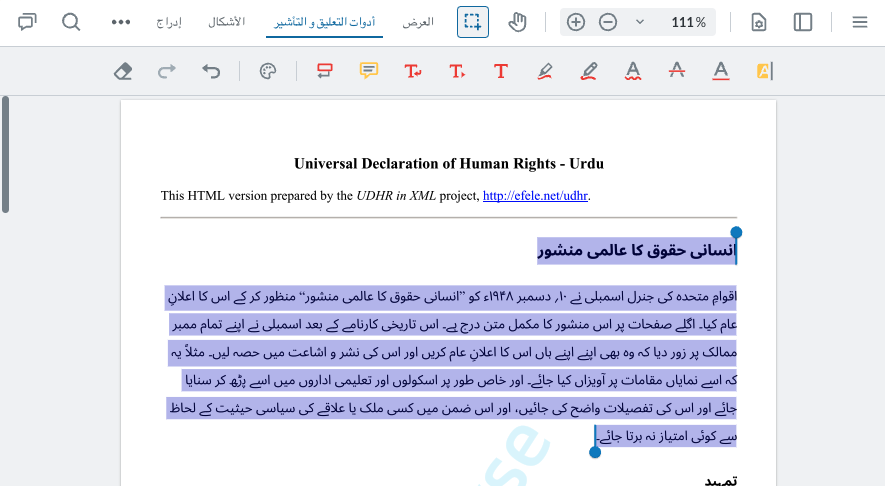
RTL Language Support Example Image
## How DocumentViewer works with RTL
Text selection, search, and annotation tools are integral parts of RTL viewing and editing.
### **Text Selection**
`DocumentViewer` automatically detects the text direction of the content being selected and adjusts the selection behavior accordingly:
* **RTL Text**: Selection starts from the rightmost character and extends leftward.
* **LTR Text**: Selection follows the traditional left-to-right pattern.
* **Visual Feedback**: The selection highlight adapts to show the correct reading order.
* **Word Boundaries**: Selection respects word boundaries in the detected language direction.
**Example**
When selecting Arabic text "مرحبا بك", the selection will flow from right to left, respecting the natural reading direction.
{% hint style="info" %}
Mixed directional content on the same line may require careful selection to achieve the desired result.
{% endhint %}
### Search
Search functionality in `DocumentViewer` is enhanced to handle RTL languages intelligently:
* **Auto-Detection**: Search pattern direction is automatically detected using Unicode bidirectional properties.
* **Pattern Matching**: RTL search patterns will match RTL text with correct directionality.
**Example**
Searching for "مرحبا" will correctly identify and highlight RTL matches.
### Tools
Most DocumentViewer tools have been enhanced to work with RTL content.
#### **Annotation Tools**
For annotation tools:
* Text markup tools (highlight, strikeout, underline) properly align with RTL text flow.
* Note positioning adapts to RTL reading patterns.
## **Best Practices**
Best practices for working with RTL include:
* Use fonts that have comprehensive RTL character support, like Noto Sans Arabic.
* Consider text alignment settings for optimal readability.
* Test with representative RTL content during development.
## **Limitations**
There are some limitations to RTL support including with fonts, punctuation, and mixed content.
### Fonts
Some fonts may have limited or inconsistent RTL support:
* **Character Coverage**: Not all fonts include complete RTL character sets.
* **Glyph Positioning**: Some fonts may not properly position RTL characters.
### Punctuation
Punctuation handling in bidirectional text can be complex:
* **Directional Punctuation** **Characters**: Characters like parentheses \`()\`, brackets \`\[]\`, and quotes \`""\` may not flip correctly.
* **Neutral Characters**: Numbers and some symbols may not position correctly in RTL context.
* **Workaround**: The bidirectional text processing system attempts to handle punctuation positioning, but complex cases may require manual adjustment.
### Mixed Content
Pages are treated as LTR or RTL based on the majority of the text directionality of its characters. When selecting LTR content on a RTL page, text will be treated as RTL and vice versa.
Current limitations with documents containing both LTR and RTL content include:
* **Line-Level Mixing**: Lines containing both LTR and RTL text may not render with perfect bidirectional ordering.
* **Selection Boundaries**: Selecting across LTR/RTL boundaries may produce unexpected results.
* **Search Accuracy**: Search results in mixed-content lines may have positioning issues.
* **Future Enhancement**: Improved bidirectional algorithm support is planned for better mixed-content handling.
---
# Agent Instructions
This documentation is published with GitBook. GitBook is the documentation platform designed so that both humans and AI agents can read, navigate, and reason over technical content effectively. Learn more at gitbook.com.
## Querying This Documentation
If you need additional information that is not directly available in this page, you can query the documentation by asking a question.
Perform an HTTP GET request on the following URL with the `ask` and `goal` query parameters:
```
GET https://docs.apryse.com/web/documentviewer/rtl-support.md?ask=&goal=
```
`ask` is the immediate question: it should be specific, self-contained, and written in natural language.
`goal` is what the user is ultimately trying to achieve, the reason they need the answer. Sharing it helps GitBook give you a better, more relevant answer. A goal is most helpful when it describes the outcome the user wants rather than restating the question. For example, with `ask=how do I create an API token`, a goal like `automate deployments from our CI pipeline` lets GitBook tailor the answer to that use case.
The response will contain a direct answer to the question and relevant excerpts and sources from the documentation.
Use this mechanism when the answer is not explicitly present in the current page, you need clarification or additional context, or you want to retrieve related documentation sections.