> For the complete documentation index, see [llms.txt](https://docs.apryse.com/llms.txt). Markdown versions of documentation pages are available by appending `.md` to page URLs; this page is available as [Markdown](https://docs.apryse.com/web/get-started/guides.md).
# Learn More About WebViewer, the JavaScript PDF Viewer Library
Discover the essentials of WebViewer guides. Learn to annotate, view, and edit PDFs across all major browsers. Explore demos, samples, and more to kickstart your journey. The Apryse Web SDK streamline
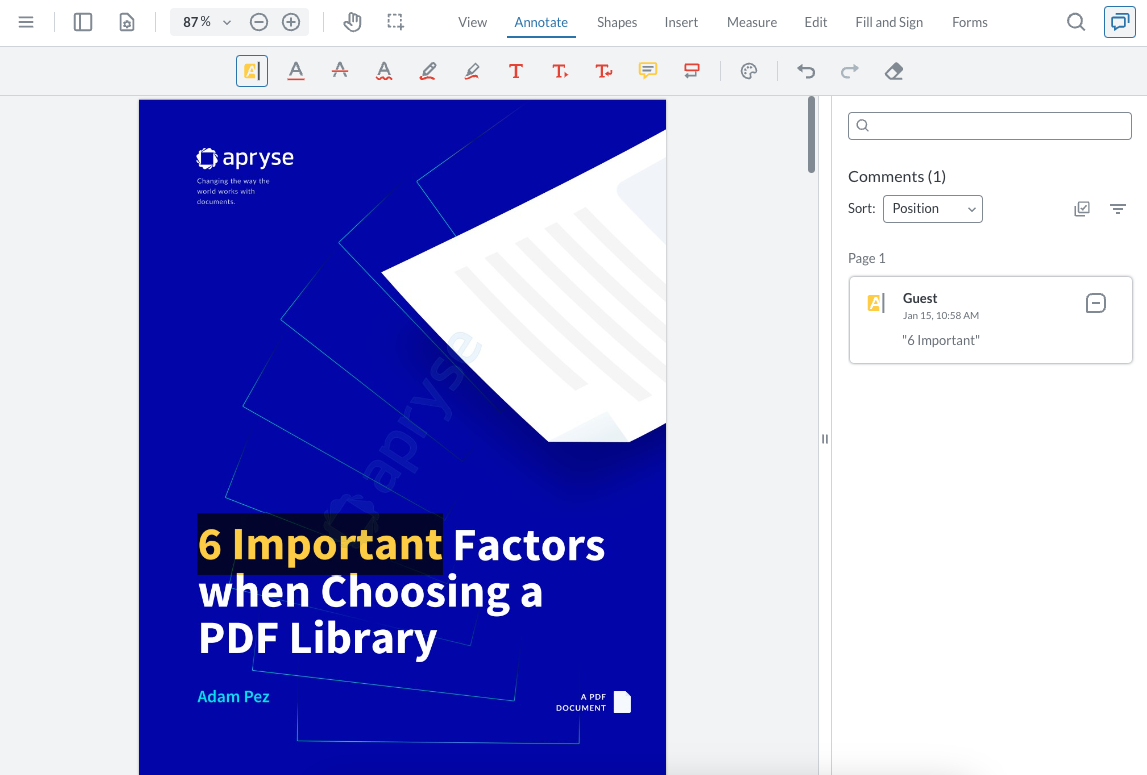
WebViewer is a JavaScript library for viewing, annotating, and editing PDFs, Office Documents, images, videos, and other [formats](/web/what-is-webviewer/file-format-support.md) inside all major browsers.
WebViewer's UI is open source and extremely customizable through a [robust API](/web/ui-customization/ui-customization.md), and can be customized even further by forking the repo.
View on GitHub
Online demoGet startedSamplesDownload
## WebViewer Basics
[Introduction to WebViewer](/web/what-is-webviewer/overview.md) An overview of how it works.
[Open a document](/web/open-save-document/open.md) Load a document, load multiple documents, load WebViewer without a document.
[Customize UI](/web/ui-customization/ui-customization.md) Hide buttons from the header, hide panels, remove print or download options.
[Save and load annotations](/web/annotation/import-export.md) Save annotations to server, database or merge them onto a PDF. Import/export of annotations in XFDF.
## Features
***
#### [Annotation and Collaboration](/web/annotation/annotation.md)
Choose from 35+ annotations or build custom markup tools. Then, leverage out-of-the-box modules to enable real-time collaboration.
#### [Digital Signatures](/web/digital-signature/signature.md)
Create complete, custom signing workflows, including signature field assignment, signature creation, collection, and validation.
#### [Redaction](/web/redaction/redaction.md)
Eliminate confidential information by searching and redacting sensitive keywords, strings, and patterns. Redact areas of images and text, or entire pages.
#### [DOCX Viewing & Editing](/web/ms-office/office.md)
Edit and create DOCX files client-side: Write and edit text, apply styling, adjust fonts and sizes, or add bulleted and numbered lists. Eliminate post-edit formatting inconsistencies with native DOCX editing, producing true WYSIWYG output quality across all Word processors.
#### [Page Manipulation](/web/page-manipulation/manipulation.md)
Add, remove, rearrange, or merge pages easily by clicking or drag-and-drop page thumbnails, or set up a programmatic workflow.
#### [Forms](/web/forms/forms.md)
Simplify form filling with features that automate data entry into your database. Fill, edit, and create new forms. Populate data from any source into existing templates.
#### [Document Generation](/web/generate/create.md)
Embed a scalable and secure document generator that merges Office templates with JSON data client-side, right in the browser.
#### [Document Comparison](/web/compare-files/compare.md)
Easily identify changes in drawings and documents with intuitive overlays, side-by-side comparisons, and semantic text differences in highlighted word pairs.
#### [Text Editing](/web/edit-page-content/text-edit.md)
Have users edit PDF text and images in your app with a leading-accuracy editor that embeds directly. Apply or change existing styling or font sizes.
#### [Measurements](/web/measurement/measurement.md)
Streamline estimates via a fast, precise measurement tool. Set drawing scale, and measure distance, area, perimeters, and more with snap-to geometry.
#### [PDF/A](/web/pdf-a/pdfa.md)
Convert PDF to PDF/A and validate PDF/A files to certain conformance levels.
#### [Text and image extraction](/web/extraction/extraction.md)
Extract text, images, and other content from documents for further processing.
{% hint style="info" %}
Not seeing what you're looking for? Contact our experts on [Discord](https://apryse.com/discord?docLink=docDis) for help building your POC.
{% endhint %}
## Learn more
[Best practices](/web/best-practices/best-practices.md) Learn best practices when it comes to WebViewer.
[WebViewer API](/web/what-is-webviewer/usage.md) Document viewing and basic PDF manipulation APIs.
[Default UI](/web/ui-customization/modular-ui/getting-started.md) A complete, responsive and fully customizable user interface
[Deployment options](/web/what-is-webviewer/deployment-options.md) Three main options for deploying WebViewer.
[WebViewer Server](/web/webviewer-server/wv-server-deployment.md) WebViewer Server increases performance on older browsers including IE9, older mobile devices.
[Server integration](/web/what-is-webviewer/deployment-options.md#webviewer-server-docker-container) Optional approach to enhancing performance and provide support for more file formats.
[Full API](/web/full-api/full-api-overview.md) More advanced document processing APIs.
[Deploy to production](/web/best-practices/optimizing-lib-folder.md) Only include what you need from the library when you are ready to deploy.
---
# Agent Instructions
This documentation is published with GitBook. GitBook is the documentation platform designed so that both humans and AI agents can read, navigate, and reason over technical content effectively. Learn more at gitbook.com.
## Querying This Documentation
If you need additional information that is not directly available in this page, you can query the documentation by asking a question.
Perform an HTTP GET request on the following URL with the `ask` and `goal` query parameters:
```
GET https://docs.apryse.com/web/get-started/guides.md?ask=&goal=
```
`ask` is the immediate question: it should be specific, self-contained, and written in natural language.
`goal` is what the user is ultimately trying to achieve, the reason they need the answer. Sharing it helps GitBook give you a better, more relevant answer. A goal is most helpful when it describes the outcome the user wants rather than restating the question. For example, with `ask=how do I create an API token`, a goal like `automate deployments from our CI pipeline` lets GitBook tailor the answer to that use case.
The response will contain a direct answer to the question and relevant excerpts and sources from the documentation.
Use this mechanism when the answer is not explicitly present in the current page, you need clarification or additional context, or you want to retrieve related documentation sections.