Product:
Sign a PDF document on Server/Desktop
To sign an existing approval signature field in a PDF Document:
Digitally sign PDF files
Full code sample which demonstrates using the digital signature API to digitally sign and/or certify PDF documents. Code sample is available in C++, C#, Java, Python, Go, PHP, Ruby & VB.
About Adding An Approval Signature to a PDF Document
The Apryse SDK enables approval signatures in PDF documents using a Digital Certificate, in accordance with the latest PDF specification. By leveraging public key infrastructure (PKI) technology, with a certificate issued by a trusted certificate authority (CA), a signer can use a certificate-based digital ID to guarantee the authenticity of a signature. Placement of a digital signature using a certificate can also guarantee that a document was not modified since the signature was placed, ensuring the authenticity of the document.
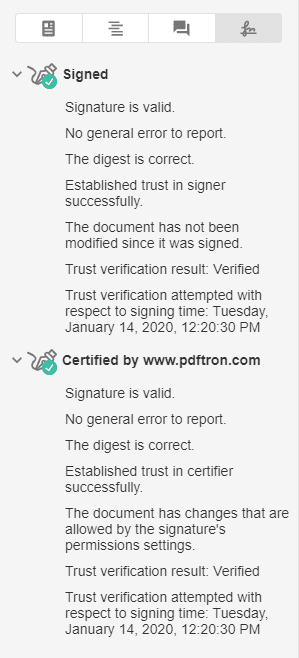
Image taken from Apryse WebViewer
Above is an example of a document containing a certified signature, guaranteed by a certificate generated by Apryse.com.
Did you find this helpful?
Trial setup questions?
Ask experts on DiscordNeed other help?
Contact SupportPricing or product questions?
Contact Sales